
Hosted Payment Page
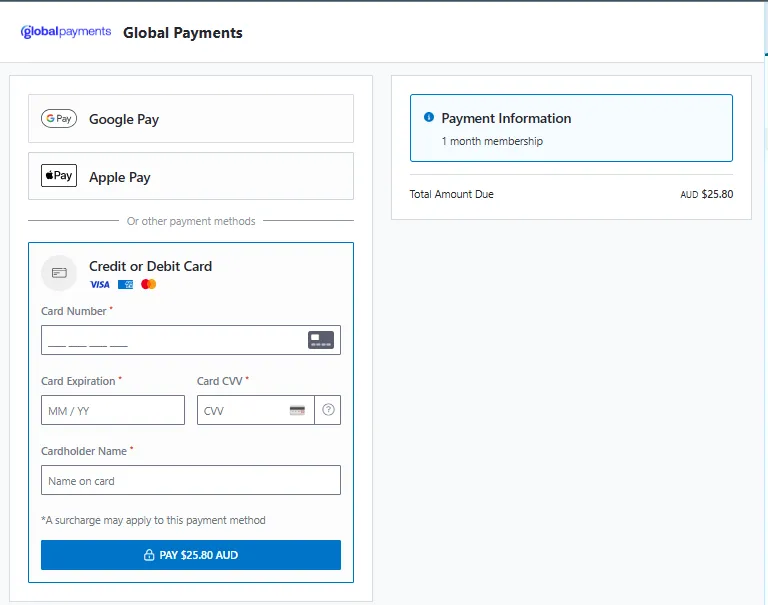
The Hosted Payment Page is a fully managed, branded checkout page that you can present at checkout.
Creating a Payment Request with the hostedPaymentPage node, will generate a hosted page link that displays your logo, line items, adjustments, and handles the payment flow end-to-end.
How It Works
- Create a Payment Request with the
hostedPaymentPagenode included. - Direct your customer to the hosted URL returned in the response.
- The customer completes payment on the branded page.
- Based on the
resultPageconfiguration, the customer sees a hosted result page, or is redirected to your site. - Receive the final payment result via webhooks or query the Payment Request result using the resource Id.
Configuration
Creating a hostedPaymentPage using the Payment Request is as follows:
{ "reference": "INV-2026-042", "payment": { "amount": 5500, "currencyCode": "AUD", "description": "Order #42 - 2x Widget Pro" }, "paymentMethods": [ "card", "google_pay" ], "hostedPaymentPage": { "merchantName": "Acme Store", "logo": "data:image/png;base64,iVBORw0KGgoAAAANSUhEUgAAAAEAAAABCAYAAAAfFcSJAAAADUlEQVR42mNk+M9QDwADhgGAWjR9awAAAABJRU5ErkJggg==", "redirectUrl": "https://merchant.example.com/thank-you", "resultPage": "show", "lineItems": [ { "title": "Widget Pro", "image": "https://merchant.example.com/images/widget.png", "amount": 2500, "quantity": 2, "modifier": "each" } ], "adjustments": [ { "title": "Postage", "order": 1, "amount": 500, "adjustmentType": "shipping" } ] }}Properties
HostedPaymentPage
| Property | Type | Required | Description |
|---|---|---|---|
merchantName | string | No | The merchant name displayed on the hosted page. Max 140 characters. Defaults to the merchant name configured during onboarding if not provided. |
logo | string | Yes | Base64-encoded image to display as the merchant logo. Use PNG, SVG, or WebP image formats only. Maximum size 10KB. |
redirectUrl | string | No | URL to redirect the customer to after payment. Required when resultPage is redirect. Optional when resultPage is show. Must be a valid URL. |
resultPage | string | No | Controls what happens after payment completes. Default is show. See Result Page Behaviour. |
lineItems | array | No | List of line items to display in the payment summary. Maximum 50 items. |
adjustments | array | No | List of adjustments (discounts, shipping, tax) applied to the order. Maximum 10 items. |
LineItem
| Property | Type | Required | Description |
|---|---|---|---|
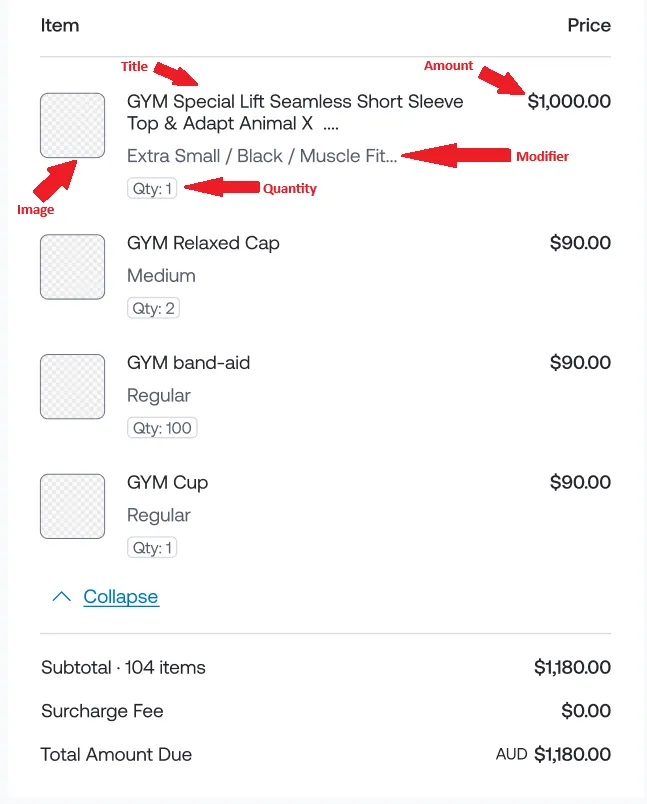
title | string | Yes | Display name of the line item. Max 50 characters. |
image | string | No | HTTPS URL of an image for the line item. Same format restrictions as logo (Use PNG, SVG, or WebP image formats only.). Maximum size 10KB. |
amount | integer | Yes | Unit price in cents (e.g. 1000 = $10.00). Must be >= 0. |
quantity | float | No | Quantity of this item. Must be > 0. Supports up to 3 decimal places (e.g. 1.5, 0.750). Defaults to 1. |
modifier | string | No | Unit label displayed alongside the quantity (e.g. “each”, “kg”). Max 50 characters. |
Adjustment
| Property | Type | Required | Description |
|---|---|---|---|
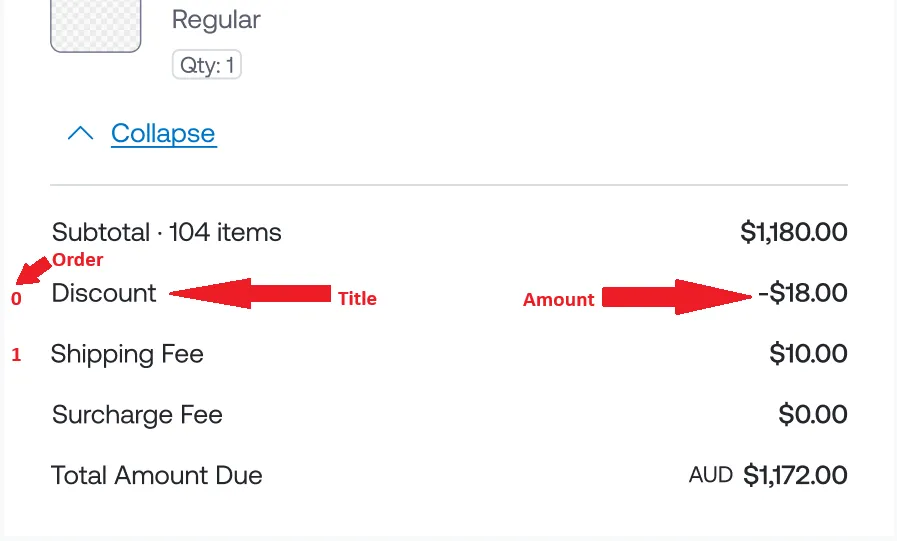
title | string | Yes | Display name of the adjustment. Max 30 characters. |
order | integer | No | Display order of this adjustment. If provided for one adjustment, it must be provided for all. Must be >= 0. No duplicate values allowed. |
amount | integer | Yes | Adjustment amount in cents. Can be negative (e.g. -1000 for a $10.00 discount), zero, or positive (e.g. 500 for a $5.00 shipping fee). |
adjustmentType | string | Yes | The type of adjustment. Defaults to other. See Adjustment Types. |
Adjustment Types
| Value | Description |
|---|---|
other | General adjustment (default) |
discount | A discount applied to the order |
shipping | A shipping fee |
tax | Tax applied to the order |
Result Page Behaviour
The resultPage property controls what happens after the customer completes (or fails) a payment:
| Value | Behaviour | redirectUrl required? |
|---|---|---|
show | Displays the Hosted Payment Page result page with payment outcome. | No (optional — if provided, a “Return to merchant” link is shown) |
redirect | Redirects the customer to redirectUrl. | Yes |
none | No action after payment. | No |
Logo and Image Requirements
- The
logomust be provided as a base64-encoded data URI (e.g.data:image/png;base64,...). Maximum size 10KB. - Line item
imageURLs must be valid HTTPS URLs. Maximum size 10KB. - Use PNG, SVG, or WebP image formats only.
Validation Rules Summary
Important: When line items and adjustments are provided, the sum of each line item’s
amount × quantityplus the sum of all adjustments must equal thepayment.amountof the Payment Request.
| Rule | Constraint |
|---|---|
Line items and adjustments total must equal payment.amount | Sum of (amount × quantity) across all line items plus sum of all adjustments |
| Maximum line items | 50 |
| Maximum adjustments | 10 |
| Merchant name length | Max 140 characters |
| Line item title length | Max 50 characters |
| Line item modifier length | Max 50 characters |
| Adjustment title length | Max 30 characters |
| Adjustment order | Optional, must be >= 0, with no duplicates |
| Line item quantity | Must be > 0, max 3 decimal places |
redirectUrl required when resultPage = redirect | Yes |